After upgrading a laptop (HP Envy dv6-7214nr) from Windows 8 to Windows 10, the laptop would frequently crash. Google Chrome was almost guaranteed to cause a crash, but even after uninstalling that, the laptop would frequently crash.
Checking Windows 10's reliability monitor showed "Apple Push" as the most frequent cause of the crash, but I could find no way to disable the "Apple Push" service.
A bit of google searching led me to this link http://answers.microsoft.com/en-us/windows/forum/windows_10-hardware/upgraded-to-windows-10-but-now-msvcp100dll-is/68475c07-090a-4fe8-9a0f-7d5f1ac0cbde?auth=1.
While not an exact match for my issue, I decided to try uninstalling all versions of "Microsoft Visual C++ 20xx Redistributable". And it worked! A few programs that relied on the missing components failed to run, but that was easily solved by reinstalling them.
Showing posts with label windows. Show all posts
Showing posts with label windows. Show all posts
Wednesday, April 20, 2016


Sunday, January 8, 2012
I had been having trouble accessing a Dell 960w wireless all-in-one printer from my Windows 7 Professional PC, but my wife's Windows 7 laptop always worked fine. I was troubleshooting another problem (same symptoms, but for NSLU2 network drive). Turns out that one solution solved both problems: http://windows7forums.com/windows-7-networking/5323-mapping-network-drive-windows-7-rc.html
Here's the content from that answer:
- Click Start
- Click Control Panel
- Click System and Maintenance
- Click Administrative Tools
- Double-Click Local Security Policy
- In the left pane, click the triangle next to Local Policy
- In the left pane, click Security Options
- In the right pane near the bottom, double-click "Network security: LAN
manager authentication level"
- Click the drop-down box, and click "Send LM & NTLM responses"
- Click OK
NSLU2 with Windows 7 Professional
I was having trouble accessing my stock NSLU2 through Windows 7 Professional, and found the following link solved the problem: http://windows7forums.com/windows-7-networking/5323-mapping-network-drive-windows-7-rc.html
Here's the content from that answer:
- Click Start
- Click Control Panel
- Click System and Maintenance
- Click Administrative Tools
- Double-Click Local Security Policy
- In the left pane, click the triangle next to Local Policy
- In the left pane, click Security Options
- In the right pane near the bottom, double-click "Network security: LAN
manager authentication level"
- Click the drop-down box, and click "Send LM & NTLM responses"
- Click OK
Here's the content from that answer:
- Click Start
- Click Control Panel
- Click System and Maintenance
- Click Administrative Tools
- Double-Click Local Security Policy
- In the left pane, click the triangle next to Local Policy
- In the left pane, click Security Options
- In the right pane near the bottom, double-click "Network security: LAN
manager authentication level"
- Click the drop-down box, and click "Send LM & NTLM responses"
- Click OK
Sunday, April 4, 2010
Removing Duplicate Files
Want to save some disk space? How about removing all duplicate copies of your files? Fortunately, there are free tools to help you do this. I used DoubleKiller after reading the LifeHacker post: http://lifehacker.com/330037/top-10-free-windows-file-wranglers.
- Found many data files that were duplicates
- Found many copies of VIRSCAN*.dat files from Symantec AntiVirus. Deleted all the ones in *.tmp folders (actually, moved them to a holding location). No issues so far.
- If you have multiple copies of Matlab installed, I would recommend removing those from the search path
Check out WinDirStat from the that LifeHacker post too.
Modifying the Windows-E Shortcut Key's Behavior
Background: Pressing the key combination [Windows Logo Key] + [e] opens Windows Explorer.
[EDIT] Recently noted my personal computer has "My Documents" appearing ahead of C:\. I need to find out how to get that for my work computer.
I use this short-cut all the time, but I was annoyed that it always opened with the C:\ fully expanded, which took-up most of the viewable space in the left-hand pane of Windows Explorer.
After a bit of web-searching and playing around, I found a solution.
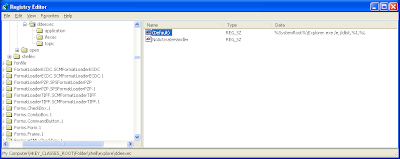
- Go to: Start Menu -> Run -> regedit
- Locate the registry key: HKEY_CLASSES_ROOT\Folder\shell\explore\ddeexec
- The (Default) value should be something like: %SystemRoot%\Explorer.exe /e,/idlist,%I,%L
- Delete this value so that the entry is blank (right-click on (Default), choose "Modify")

[EDIT] Recently noted my personal computer has "My Documents" appearing ahead of C:\. I need to find out how to get that for my work computer.
Subscribe to:
Posts (Atom)